
 Español
 Deutsch
 Français
 Italiano
 Português
 中文
 日本語
 한국어

The report
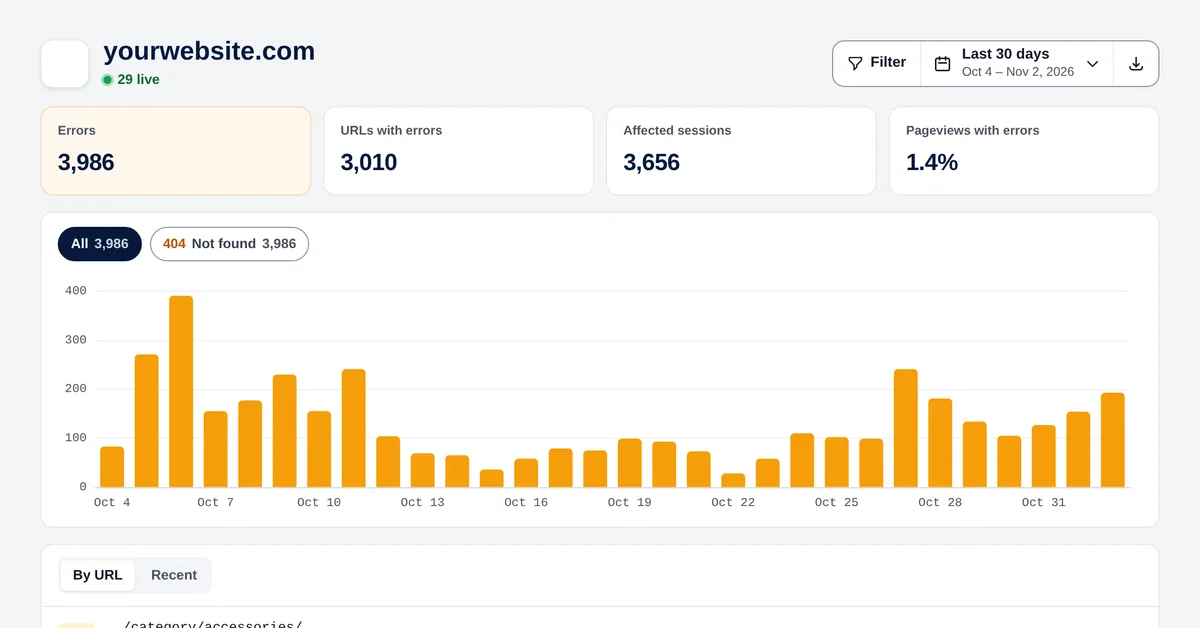
- Errors, URLs with errors, affected sessions and % of pageviews with errors.
- Chart per day and per code: 4xx (not found, gone…) in orange and 5xx (server errors) in red. Click a code to see only that one.
- By URL: times, sessions and last time; or Recent, one by one.
Find the broken link
Open a URL to see where visitors came from:
- A page of your own website: a broken internal link (highlighted). Fix the link on that page.
- Another website: someone links to a page that doesn’t exist. Create a redirect to the right page.
- A reload or direct traffic: an old bookmark or a mistyped address.
Fix them
- Deleted or moved content: a 301 redirect to the closest page.
- Images and files: upload them again or fix the path in your template.
- 500 errors: check your server or plugin logs at the times shown.
Turn the detection on or off in Settings → General. Errors can be exported as CSV.