
 Español
 Deutsch
 Français
 Italiano
 Português
 中文
 日本語
 한국어

How each channel is decided
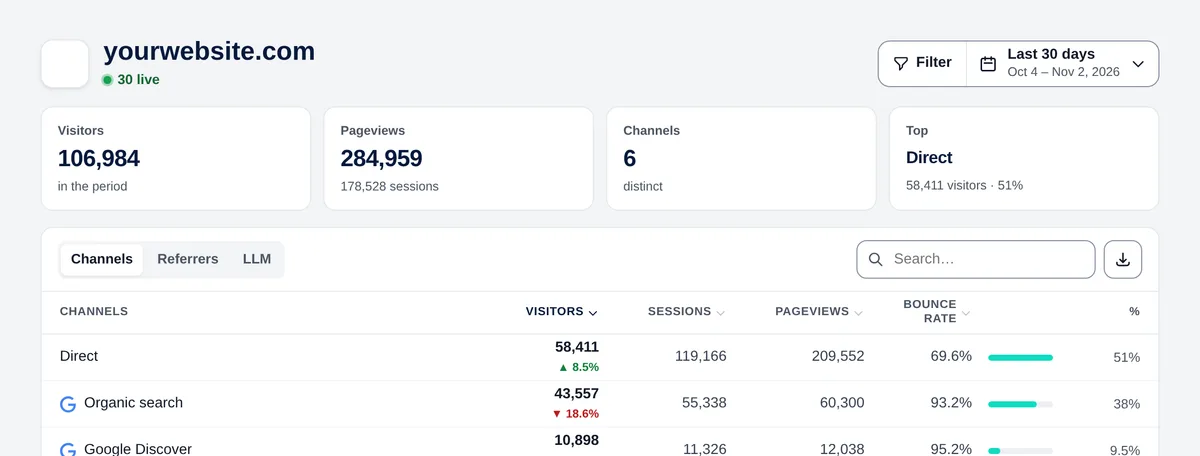
Each visit goes into a single channel, checking these rules in this order:
| Channel | When |
|---|---|
| Paid search | The visit comes from a Google Ads or Microsoft Ads ad (they add their click identifier: gclid, gbraid, wbraid, gad_source, dclid or msclkid), or the link has a paid utm_medium (cpc, ppc, paid, sem, cpm, display…). |
| Paid social | It comes from a social network with an ad click identifier (TikTok, Snapchat, LinkedIn) or with a paid utm_medium. |
| Google Discover | It comes from the Google app on Android. |
| AI assistants | It comes from ChatGPT, Claude, Perplexity, Gemini, Copilot, Poe, You.com, Phind or Grok, or the UTM says so (utm_source with their name, or utm_medium = llm, ai or ai-chat). |
| Direct | There’s no referrer, or it comes from your own domain. |
| Organic search | It comes from Google, Bing, Yahoo, DuckDuckGo, Brave, Ecosia, Startpage or Qwant. |
| Organic social | It comes from Facebook, Instagram, X, TikTok, LinkedIn, Pinterest, Reddit, YouTube, Threads and other networks. |
| Referral | Any other website that links to you. |
Tip: Google Ads and Microsoft Ads are detected automatically with auto-tagging. For other ad networks (Meta, newsletters with ads, programmatic…), add utm_medium=cpc, paid or display to the links of your ads.
“Direct” also includes visits whose browser or app doesn’t pass the referrer (some apps, links in PDFs or emails without UTM).
Referrers and AI assistants
The Referrers tab shows the exact website (with its icon) that sent each visit. The LLM tab breaks down the “AI assistants” channel: ChatGPT, Claude, Perplexity, Gemini, Copilot, Poe, You.com, Phind, Grok and “Other LLM”.
Tip: If AI assistants send you visits, look at which pages they land on (filter by the channel and check Entry pages): that’s the content AIs recommend.
Tag your campaigns with UTM
Add these parameters to the links of your newsletters, ads and posts so that they show up in the UTM report:
https://mydomain.com/offer/?utm_source=newsletter&utm_medium=email&utm_campaign=black-friday- utm_source: who sends the visit (newsletter, facebook, partner-x).
- utm_medium: the type of channel (email, social, or cpc / paid / display for ads, which then count as paid traffic).
- utm_campaign: the name of the campaign.
Tip: Always use lowercase and the same names: “Newsletter” and “newsletter” are counted as two different sources.
